Wednesday, March 16, 2011

Access Web Databases on AccessHosting.com: What is OData and Why Should I Care?

Updated 3/16/2011 with addition of LightSwitch Beta 2 as an OData consumer.

Updated 3/14/2011 with instructions for logging in to the Northwind Traders demonstration Web Database with public, View Only permission and viewing list/table data with PowerPivot for Excel. See the Browsing OData-formatted Web Database Content in PowerPivot for Excel section below.

One of the data interchange formats for SharePoint lists is the Open Data Protocol. According to Microsoft’s Open Data Protocol (OData) Web site:

imageThe Open Data Protocol (OData) is a Web protocol for querying and updating data that provides a way to unlock your data and free it from silos that exist in applications today. OData does this by applying and building upon Web technologies such as HTTP, Atom Publishing Protocol (AtomPub) and JSON to provide access to information from a variety of applications,services, and stores. The protocol emerged from experiences implementing AtomPub clients and servers in a variety of products over the past several years. OData is being used to expose and access information from a variety of sources including, but not limited to, relational databases, file systems, content management systems and traditional Web sites.

OData is consistent with the way the Web works - it makes a deep commitment to URIs for resource identification and commits to an HTTP-based, uniform interface for interacting with those resources (just like the Web). This commitment to core Web principles allows OData to enable a new level of data integration and interoperability across a broad range of clients, servers,services, and tools.

OData is released under [Microsoft’s] Open Specification Promise to allow anyone to freely interoperate with OData implementations.

OData was known during its beta period as Project “Astoria” and later as ADO.NET Data Services. It’s current name is Windows Communication Framework (WCF) Data Services. OData’s generally accepted as adhering to the Web’s Representational State Transfer (REST) architectural style, which qualifies the protocol as RESTful. You can keep up to date with OData developments by subscribing to MSDN’s  WCF Data Services Team blog.

The OData Web site provides the following lists of application that expose OData services and current live OData services:

imageApplications that can expose OData Services

SharePoint 2010

Any data you've got on SharePoint as of version 2010 can be manipulated via the OData protocol, which makes the SharePoint developer API considerably simpler.

IBM WebSphere

The IBM the WebSphere eXtreme Scale REST data service supports OData.

Microsoft SQL Azure

If you have a SQL Azure database account you can easily expose an OData service through a simple configuration portal. You can select authenticated or anonymous access and expose different OData views according to permissions granted to the specified SQL Azure database user.

Windows Azure Table Storage

Windows Azure Table provides scalable, available, and durable structured storage in the form of tables exposed as OData services.

SQL Server Reporting Services

Microsoft SQL Server 2008 R2 Reporting Services can expose data from reports as OData. [See TechNet’s Generating Data Feeds from Reports (Report Builder 3.0 and SSRS) article, which mentions AtomPub but not OData.]

Microsoft Dynamics CRM 2011

The latest version allows you to query using OData

GeoREST

GeoREST is a web-centric framework for distributing geospatial data. It allows RESTful feature-based access to spatial data sources, including full editing capabilities, through a MapGuide server or directly via FDO.

SDL Tridion 2011

SDL Tridion is a Web Content Management solution, the Content Services component now supports OData

Webnodes CMS

Webnodes CMS is an enterprise quality ASP.NET CMS with a unique semantic content technology. Webnodes recently added OData support. Read more about it here.

Telerik OpenAccess ORM

In mid-2010 Telerik released a LINQ implementation that is simple to use and produces domain models very fast. Built on top of the enterprise-grade Telerik OpenAccess ORM the LINQ implementation allows you to easily build an OData feed via a few easy steps by using the OpenAccess Visual Designer and the Data Services Wizard. For more info, visit www.telerik.com/odata

Sitefinity CMS by Telerik

The Sitefinity CMS by Telerik is ready to host OData services. With the powerful API, any developer can expose any information from the CMS through a custom OData service. For more info, visit

Telerik TeamPulse

The Telerik TeamPulse Silverlight client interacts with the database using a WCF data service, and more specifically by using the Open Data Protocol which is a popular way to expose information from a variety of sources including, but not limited to, relational databases, file systems, content management systems and traditional Web sites.

The OData protocol comes in extremely handy for TeamPulse, because it exposes the TeamPulse data for digesting and distribution among teams and people, making sure that everyone will find what they need very quickly within the large repository of valuable information in the TeamPulse data store. For more info, visit www.telerik.com/odata

Build your own

Using the OData-SDK you can add support for OData to your application.

image Live OData Services

Facebook Insights

An OData Service for consuming Facebook Insights data.

browse...

ebay

ebay now exposes its catalog via OData

browse...

Netflix

The complete netflix catalog title via OData.  See the Netflix developer OData documentation for more information

browse...

twitpic

twitpic now exposes its Images, Users, Comments etc via OData

browse...

Windows Live

You can now use an OData client to talk to your Windows Live resources (Photos, Contacts, Status, etc) whose REST endpoints are now OData endpoints.


Microsoft PDC 2010

Information about all the sessions / speakers etc for Microsoft PDC 2010 exposed via OData

browse...

Pluralsight

Pluralsight courses are now available via an OData feed

browse...

DevExpress Channel

DevExpress has lots of training videos, now available via an OData feed.

browse...

vanGuide

A social map of Vancouver Open Data. A collection of data services showing everything from parking lots to drinking fountains.

browse...

Vancouver Street Parking

This feed exposes Vancouver street parking information.

browse...

Open Government Data Initiative

Open Government Data Initiative (OGDI) is an open source data publishing solution for government agencies.

browse...

Open Science Data Initiative

OSDI is based on OGDI which in turn uses the Azure Services Platform to make it easier to publish and use a wide variety of scientific data from government agencies.

Lots of feeds but no service document. You can however use their custom browser.

The City of Edmonton Open Data Catalogue

Public data from the city of Edmonton.

browse...

Windows Azure Marketplace DataMarket

Windows Azure Marketplace DataMarket allows producers to sell premier data to consumers, using OData.


TechEd 2010

Microsoft TechEd 2010 conference session data.

browse...

Nerd Dinner

Nerd Dinner is a website that helps nerds to meet and talk, not surprisingly it has adopted OData

browse...

DBpedia

A community effort to extract structured information from Wikipedia and to make this information available on the Web, with full support for OData interactions on the live query services. (Powered by OpenLink Virtuoso.)

browse or query

Linked Open Data Cloud Cache

Mirrors and interlinks dozens of data sets including all of data.gov, with full support for OData interactions. (Powered by OpenLink Virtuoso.)

browse or query

OData Test Service (Read-Only)

This service is specially designed to introduce OData, it has a simple model and only a small number of resources.

browse...

OData Test Service (Read-Write)

As above, but this time read-write (with some restrictions).

browse...

Northwind

The famous Northwind Database exposed as an OData Service.

browse...

OData Website Data

Data, like producers and consumers, from the OData Website exposed as OData.

browse...

Stack Overflow

Q&A for programmers

browse...

Super User

Q&A for computer enthusiasts and power users

browse...

Server Fault

Q&A for system administrators and IT professionals

browse...

Meta Stack Overflow

Q&A about Stack Overflow, Server Fault and Super User

browse...

Telerik TV

Telerik's catalog of libraries, videos, Tags and Series

browse ...

Public Transit Data Community

Collection of mass transit data from a variety of transportation agencies across the United States. See developer documentation for more details.

browse ...

LogMyTime

Project time tracking software for freelancers and small to medium teams.

browse...

INETA Live

INETA Live has an OData feed providing access to their vast library of User Group Presentations.

browse...

Microsoft Pinpoint

Microsoft Pinpoint marketplace now exposes its data using OData - more details coming soon


Proagora

Proagora is a site that allows you to search for jobs, companies, and experts.

browse in English or French

One of the primary applications for OData-formatted information is delivering data to smartphones. Following is a list of OData consumers from the OData Web site with smartphone consumer SDKs emphasized:

imageOData Consumers
Browsers

Most modern browsers allow you to browse Atom based feeds. Simply point your browser at one of the OData producers.

Visual Studio LightSwitch

VS LightSwitch Beta 2 supports OData from SharePoint 2010 lists, as well as SQL Server and SQL Azure as data sources. Initial tests with Access Web Databases throw an error. I’ll report the status of a fix for the error with an update.

OData Explorer

A Silverlight application that can browse OData Services. It is available as part of the OData SDK Code Samples, and is available online at Silverlight.net/ODataExplorer.

Excel 2010

PowerPivot for Excel 2010 is a plugin to Excel 2010 that has OData support built-in.

LinQPad

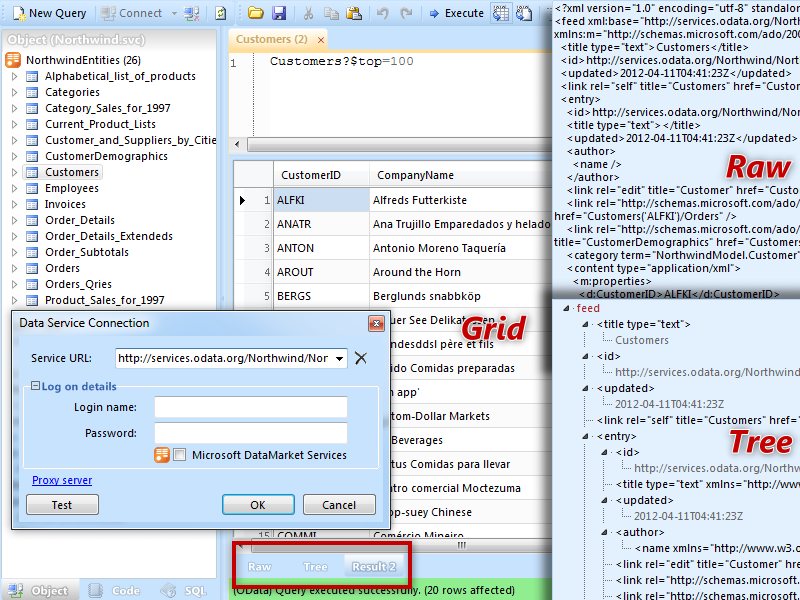
LINQPad is a tool for building OData queries interactively.

Sesame - OData Browser

A preview version of Fabrice Marguerie's OData Browser.

Client Libraries

Client libraries are programming libraries that make it easy to consume OData services. We already have libraries that target:

For a complete list visit the OData SDK.

OData Helper for WebMatrix

The OData Helper for WebMatrix and ASP.NET Web Pages allows you to easily retrieve and update data from any service that exposes its data using the OData Protocol.

Tableau

Tableau - an excellent client-side analytics tool - can now consume OData feeds

Telerik RadGrid for ASP.NET Ajax

RadGrid for ASP.NET Ajax supports automatic client-side databinding for OData services, even at remote URLs (through JSONP), where you get automatic binding, paging, filtering and sorting of the data with Telerik Ajax Grid.

Telerik RadControls for Silverlight and WPF

Being built on a naturally rich UI technology, the Telerik Silverlight and WPF controls will display the data in nifty styles and custom-tailored filters. Hierarchy, sorting, filtering, grouping, etc. are performed directly on the service with no extra development effort.

Telerik Reporting

Telerik Reporting can connect and consume an existing OData feed with the help of WCF Data Services.

Database .NET v3

Database .NET v3 - A free, easy-to-use and intuitive database management tool, supports OData


Browsing OData-formatted Web Database Content in PowerPivot for Excel

imageAfter downloading and installing PowerPivot for Excel 2010 from http://powerpivot.com/, click the PowerPivot tab to open the PowerPivot ribbon and click the PowerPivot Window Launch button to open its ribbon.

Update 3/14/2011: If you want to run a live test with the NorthwindTraders Web Database site hosted in an AccessHosting.com Trial account, connect to http://oakleaf.accesshoster.com/NorthwindTraders/_vti_bin/listdata.svc in a browser. When the Windows Security dialog appears, type AH\devtest1 as the username and access as the password,  and mark the Remember My Credentials check box:

image

Figure 1.

Click OK to display the OData metadata:

image

Figure 2.

imageLeave the metadata window open, click the From Data Feeds button to open the Table Import Wizard’s Connect to Data Feed dialog, type or paste the same Data Feed URL, http://oakleaf.accesshoster.com/NorthwindTraders/_vti_bin/listdata.svc for the demonstration Web Database, and add a Friendly Connection Name, as shown here:

imageFigure 3.

imageClick Next to open the Select Tables and Views dialog, after providing your credentials again, if requested. Mark the check boxes for the Source Tables (lists) you want to include:

image Figure 4.

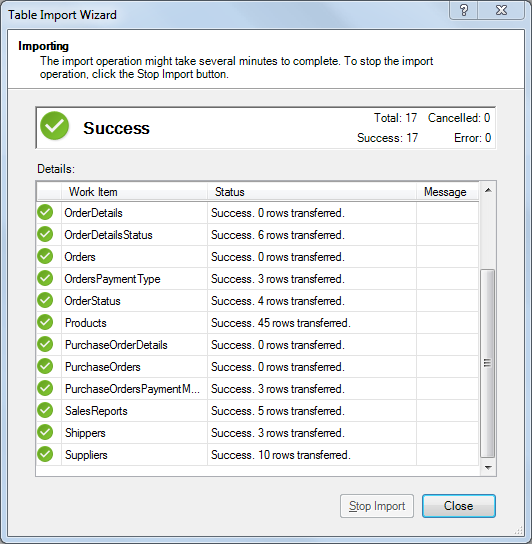
Click Finish to import the data:

image

Figure 5.

Click Close to display the contents of the first list in alphabetical order (Categories). Click the tab at the bottom of the page to display the list you want (Products for this example):

image

Figure 6.

Select the columns that don’t contain interesting information, right click a selected column and choose Hide or Delete to remove it fom the Pivot table, and drag foreign key (lookup) values, such as CategoryID and SupplierID to the left:

image

Figure 7.

At this point, you can perform all common Excel PivotTable operations on the PowerPivot data.

Tuesday, March 15, 2011

Kay Eubank Reviews “Access 2010 In Depth” for the I Programmer Web Site

    • image Author: Roger Jennings
    • Publisher: Que, 2010
    • Pages: 1200 + 300 online/pdf
    • ISBN: 978-0789743077
    • Aimed at: Intermediate users
    • Rating: 4
    • Pros: The author knows what he’s talking about and writes well.
    • Cons: Some of the most interesting material is in the online-only section
    • Reviewed by: Kay Ewbank

This big book is designed to tell you everything about using Access 2010. In fact, it’s such a big book that a third of it is only available online or as a PDF.

The first section of the book takes you through what’s new in Access 2010 if you’ve been using Access 2007, it then goes on to using the online templates and the new Office interface. Part II of the book covers fundamentals - relational database theory, tables and working with data. The details are explained well, though I personally find it strange the way the In Depth titles mix quite complex topics with ‘press this key, then this one, and you’ll see this appear on the screen’. If you need the latter in terms of hand-holding, it’s unlikely you’ll be able to cope with the former. The section on queries takes up the next 180 pages and covers everything about Access queries, including topics such as cross-tab queries, different join types, and both Access and SQL Server SQL.

Banner

The section on forms and reports starts with the use of auto-generated forms and reports, and goes through to topics such as grouping with subgroups, using subreports and unlinked reports. There’s a nice chapter on using Microsoft Graph to add graphs and pivot-charts to your forms and reports.

So far, everything makes logical sense in terms of what’s being covered, but the paper element of the book finishes with chapters that are chosen for other reasons. As Access 2010 has a revamped macro interface and Microsoft is ‘de-emphasizing’ Visual Basic for Applications for Access 2010, macro programming gets a chapter in the paper part of the book, while the chapter on VBA is only available online. Then come chapters on collaborating with Windows SharePoint Foundation Server, and sharing web databases with SharePoint Server 2010. It would be interesting to see statistics on how many companies are using Access with SharePoint - I suspect the figure is lower than Microsoft would like. However, the material is useful if you’re going to have to work with SharePoint - I’d just have preferred to see those chapters in the online section rather than the VBA chapters and the chapters on using Access with SQL Server.

That’s it for the paper part of the book. The online part kicks off with working with HTML and XML documents, importing and exporting web pages, integrating with XML and InfoPath. There’s a good description of analysing and using HTML data and how to use utilities such as HTML Tidy. The coverage of SQL Server with Access gets a couple of hundred pages with a short section on linking Access applications to SQL Azure, Microsoft’s cloud-based version of SQL Server.

The final section covers programming with VBA, and starts from the basics of what’s a module, program flow, and error handling. From there onwards the material is well organized in terms of how you’re likely to actually use code in Access - event handling, programming combo and list boxes, understanding DAO, OLE DB and ADO, and upgrading older VBA applications to work with 2010.

Overall, this is a good book, and I’m happy to have it on my bookshelf. I’d have been even happier if it had all been there, but as it gives you arm ache holding it anyway, I do see why they made some of it online only. What seems really strange is the fact that so far as I can see, the Kindle version is identical in that you still have to download the extra pages.

bookbuy

Read the original review here.


Here are my comments about the online-only content from the book’s Amazon page:

imageI've advised the publisher of the reviews concerning lack of emphasis on the ~500 pages of online-only content.

It should be noted that QUE Publishing reduced the list price of the book by $10.00 from "Special Edition Using Microsoft Office Access 2007" ($49.99) and by $20.00 from that of the "Special Edition Using Microsoft Office Access 2003" edition ($59.99). Amazon's discounted prices are $25.50 (2010), $30.69 (2007) and $37.40 (2003). The discount percentage differs for each edition.

The online-only chapters cover advanced topics … that the Access team is deemphasizing in the 2010 version: primarily Access Data Projects (in favor of SharePoint back ends) and Visual Basic for Applications (in favor of Access macros, which Access Web Databases support.)


image Regarding “It would be interesting to see statistics on how many companies are using Access with SharePoint - I suspect the figure is lower than Microsoft would like. However, the material is useful if you’re going to have to work with SharePoint - I’d just have preferred to see those chapters in the online section rather than the VBA chapters and the chapters on using Access with SQL Server.” --

SharePoint 2010 and later will be a major player in Access’s future.

SharePoint Server 2010 Enterprise Edition’s Access Services enable deploying Access Web Databases to the public Internet or private intranet. Web Databases supplant the discontinued Access Data Projects (ADPs) supported by Access 2003 and earlier. Web Databases let you take advantage of Access’s Rapid Application Development (RAD) features and a Wizard to automatically deploy *.accdb projects to an on-premises or hosted SharePoint Server 2010 instance.

image Access Hosting now offers low cost (US$19/month for one, US$49 for up to five, or US$99 multi-tenanted hosting for up to 10 users. Office 365 will deliver Access Services and other Office Online applications for US$6 monthly per user when it releases to commercial service later this year. Both Access Hosting and Office 365 offer a free 30-day trial period.

See my following posts for more details about using Access and SharePoint together:


Sunday, March 13, 2011

Access Web Databases on AccessHosting.com: Adding User Logins and Assigning Permissions

Updated 3/14/2011 with details for enabling the AH\devtest1 login as a read-only user account for public access.

Logon to http://oakleaf.accesshoster.com/NorthwindTraders/ with AH\devtest1 as the User Name and access as the password for View Only permission.

image Note: The procedures described here will be demonstrated in my Upsizing Access 2010 Projects to Web Databases with SharePoint 2010 Server Webcast on 3/29/2011 at 9:00 AM PDT. See my Three Microsoft Access 2010 Webcasts Scheduled by Que Publishing for March, April and May 2011 post of 3/5/2011 for more Webcast details.


image One reason for upsizing Access databases to SharePoint Server 2010 is to regain a semblance of the granular user- and group-level security features offered by Access 2003 and earlier for networked applications. Access 2010 doesn’t support creating Workgroup files, but you can still password-protect *.accdb databases.

If password protection isn’t granular enough and you want to assign individual users or groups read-only or read/write permissions for data, you must create custom access control lists (ACLs) for networked *.accdb files and the shares that contain them. Alternatively, you can upsize tables to Web Databases running on SharePoint Server 2010’s Access Services or SQL Server 2005 [Express] or later. Web Databases also let you enable only specific users or groups to make form/report design changes or delete objects.

When AccessHosting.com creates your trial or paid account, they assign you a domain name (oakleaf for the current blog series) and an administrative user account in the AH domain, such as AH/rogerjennings, and a preassigned, unique password. All subscriptions enable two developer test accounts, AH/devtest1 and AH/devtest2 with a fixed access (lower case) password for emulating multiple users. The administrative account is valid only for the subscription domain and has Full Control/Limited Access permissions by default. The developer/test accounts can be used against any Web Database; if you assign them site permissions, they enable public access. 

To view default user accounts and their permissions, open the Options menu and select Site Permissions …:

image

to open the Permission Tools page and ribbon:

image 

The administrative user by default has Full Control, Limited Access permission, which enables all authoring activities except saving changes to data. For example, you can create a new Order, but you can’t save the changes you make after you create it:

image

The later “Enabling the Administrative Account to Save Changes to Records” section shows you how to fix the preceding problem.


imageMicrosoft recommends using group membership to assign permissions, but assigning individual user permissions is simpler if you have only a few users. Thus, the first step in the permissions process is to click the Stop Inheriting Permissions button to enable setting unique permissions on a site-by-site basis and enable the Grant Permissions dialog’s Grant Users Permission Directly option, as shown below:

Creating a Login and Enabling Permissions for a Developer/Test Account

image Click the Grant Permissions button to open the dialog of the same name and type AH/devtest1 in the Users/Groups text box.

image Click the Check Names button to verify the Account Name, Developer Test 1.

AH/devtest1 is a public login, known to anyone who has watched AccessHosting.com’s How to Add Users to Your Access Hosting Site video tutorial, so mark the View Only check box to prevent unauthorized modifications to your site’s data.

Clear the Send Welcome E-Mail to the New Users check box. Your Grant Permissions dialog appears as shown here:

image

Scroll to the bottom of the dialog and click OK to assign the permissions. Close the Grant Permissions dialog to verify the added permissions:

image

Open the menu below your administrative user name and choose Sign in as [a] Different User:

image

Test the login by connecting with AH\devtest1 as the User Name and access as as the password:

image

You receive the “You do not have permissions to edit records” message shown earlier.

You can visit the NorthwindTraders site with the preceding credentials until at least June 30, 2011.


Enabling the Administrative Account to Save Changes to Records

image

Open the Permissions Tools ribbon, click the Grant Permissions button, type the administrative user’s AH\username, and select the Grant Users Permission Directly option. Mark the Full Control, Design, Contribute and Read check boxes. Clear the Send Welcome E-Mail to the New Users check box:

image

Scroll to the bottom of the dialog and click OK to assign the permissions. Close the Grant Permissions dialog to verify the added permissions:

image

Add a new order and a line item or two, and click the Update Total button:

image

image Click the Save button to verify that you can save data changes, then add Shipping and Payment (Sales Tax) information, click Update Total and then Invoice Order. Click Yes when asked if you want to print the invoice:

image

It’s not clear why the Invoices report doesn’t appear in the Report Center list because it doesn’t appear to have any features that Web Databases don’t support.

Access Web Databases on AccessHosting.com: Viewing, Printing and Editing Reports

image Upsizing an Access 2010 report with SharePoint 2010’s Access Services converts Access’s report design details to SQL Server 2008 R2 Report Definition Language and saves the design in SQL Server Report Design Language  (ReportName.rdl).

Viewing and Printing Reports

NorthwindTraders’ Report Center tab lists three available reports. Clicking a Select a Report link opens the report for viewing and printing:

image

image Note: The original *.accdb database included Invoice, Invoice_ClientOnly, MonthlySales_ClientOnly, QuarterlySales_ClientOnly, and YearlySales_ClientOnly reports that don’t appear in the list. Reports including features not supported by Web Databases don’t upsize to SharePoint 2010. It’s not clear why the Invoices report doesn’t appear in the Report Center list because it doesn’t seem to have any features that Web Databases don’t support.

Click Open in New tab to display a paged version of the entire reportwith out the right IFrame:

image

Right-click and choose Print to open the Print dialog and choose the printer you want. If you have One Note 2010 installed, you can Send the report to a One Note page.

Editing Report Properties

The Report Definitions Document Library stores *.rdl files. To display the list of *.rdl files, open the Options menu and choose Site Permissions:

image

To display the Permission Tools ribbon:

image

Click the Libraries link to open the All Site Content page with the Document Libraries View selected: 

image

Click the Report Definitions link to open the library:

image 

If you double-click a Name link, you receive the following error message (expected behavior):

clip_image002

Select the report to manipulate and open its drop-down menu:

image

You can View or Edit the *.rdl file’s Name and Title properties:

image 

Choosing Edit in Report Builder prompts you to download SQL Server 2008 R2 Report Builder 3.0. If you don’t have .NET Framework v3.5 or later installed, you are prompted to download it before downloading Report Builder.

Note: Internet Explorer 9 Release Candidate doesn’t recognize the presence of .NET Framework v3.5 or v4.0 and Compatibility View isn’t available for the page requesting the download. Therefore, you can’t install Report Builder with this browser.

Note: Windows 7 includes .NET Framework v3.5.1 as a Windows component, which you can enable with the Turn Windows Feature On or Off option of Control Panel’s Programs and Features tool:

image

When you choose Edit in Report Builder for a Web Database, Report Builder’s Splash Screen opens, followed by a message that you can’t open the *.rdl file:

image

Clicking OK opens Report Builder’s designer for a new report:

image

Microsoft Access can’t modify the design of reports you create with Report Builder.