Showing posts with label SharePoint Server 2010. Show all posts

Sunday, December 18, 2011

New Competition for Access Web Databases: InfoPath 2010 Forms and SharePoint 2010 Online

Si Dunn (@grumblecore) posted a comprehensive review of Using Microsoft InfoPath 2010 with Microsoft SharePoint 2010: Step by Step on 12/14/2011:

Using Microsoft InfoPath 2010 with Microsoft SharePoint 2010: Step by Step
By Darvish Shadravan and Laura Rogers
(Microsoft Press, paperback, list price $34.99; Kindle edition, list price $31.99)

imageA 21st century Shakespeare might write: “All the world’s a form, and we are just filling it in.”

One of this book’s authors contends (not completely in jest) that “forms run the world. Imagine modern life without forms, both paper and digital–it’s not possible! Everything that is known and recorded about you, from your birth city to your magazine subscriptions, to your preference of aisle or window seats–yes, all of this information was entered in a form at some point in time.”

imageMicrosoft InfoPath 2010 is used to design and build electronic forms, as well as gather data, without writing code. Meanwhile, SharePoint Server 2010 “offers a robust architecture for managing access to data connections and external systems.” SharePoint is Microsoft’s suite of software tools aimed at making it “easier for people work together,” whether in the same office or scattered around the planet.

imageThis well-written and nicely illustrated book shows how to bring the two products together in powerful ways that (1) enable InfoPath forms to be created and formatted and (2) integrate data from SharePoint and other company systems. InfoPath forms also can be hosted on SharePoint.

The book is aimed at “any information worker that needs to build and use electronic forms that will be stored in SharePoint.” Its goal is to “teach you the basics of building and using InfoPath 2010 forms in a SharePoint 2010 environment.”

The writers assume you are at least a “savvy Office and Windows user.” It is helpful, but not mandatory, to also have at least some basic familiarity with SharePoint Server 2010. “However, even if you’re not a SharePoint guru, most topics in this book should be within your grasp,” they point out.

If you do not have a SharePoint environment in your company, “InfoPath 2010 supports the creation of forms in Microsoft Office 365,” the two authors note. Office 365 is Microsoft’s cloud product that provides online access to a variety of programs for communicating and collaborating. [Emphasis added.]

InfoPath has been around for a few years and recently was given a significant update. But many businesses and computer users do not have it.

That’s not show-stopper when InfoPath and SharePoint work together, the authors point out. ”If you create your forms as browser-enabled form templates, users who don’t have InfoPath installed on their computer can still work with the form in a browser. This lets you share business forms with a variety of users, including employees, customers, and vendors.”

The 446-page book has 14 chapters. The first four chapters show how to create and format forms using InfoPath. The remaining chapters focus on using InfoPath with SharePoint.

According to the two authors, “the mission of this book is to help you understand how to create business forms that provide a pleasant, reliable, and intuitive experience for your users and customers,” they write.

The process of creating, formatting and publishing forms is shown and described in clear, succinct how-to steps. Practice files can be downloaded from a Microsoft site, and the exercise topics range from the basics of form design to building an approval process and working with SharePoint views and dashboards, to (1) “control what fields are displayed at any given time” and (2) “generate reports from any information in SharePoint lists and libraries.”

The authors add: “SharePoint libraries, specifically form libraries, are well suited for storing and managing InfoPath forms.”

InfoPath’s native language is XML, “perhaps the single most powerful method of storing and sharing structured data to come along since the advent of digital computing.” Creating electronic forms has long been a code-intensive process.

InfoPath hides most of the XML behind an easy-to-use interface. And XSLT (Extensible Style Sheet Language) style sheets also “‘sit in front of’ the underlying XML and transform it into the rich and easy-to-use forms that InfoPath can create.”

The book’s illustrations, short paragraphs, step-by-step lists and example files can all help readers get up to speed quickly, whether Microsoft InfoPath 2010 is used with Microsoft SharePoint on a company network or via the cloud, by way of Office 365.

– Si Dunn‘s latest book is a novel, Erwin’s Law. His other published works include Jump, a novella, and a book of poetry and several short stories, all available on Kindle. He previously worked in the telecommunications industry as a software and hardware tester and technical writer.

My Introducing Microsoft Office InfoPath 2003 book for Microsoft Press is still generating a few royalty checks.


Sunday, July 17, 2011

Migrate Access 2000 or Later Databases to Public or Private Rollbase Clouds

imageNow that Office 365 has been released to the Web (RTW) for commercial use, there is considerable interest in taking advantage of SharePoint Online’s Access Services to create Web-based data management applications (Access Web Databases) at a monthly cost of US$6 per user. An advantage of this approach is that Access Services supports migration of tables, queries, forms and macros to SharePoint lists, Web pages and workflows. Alternatively, you can move just the Access tables to SharePoint Online and link them to on-premises Access front-ends. Optional local data caching improves data access performance and enables offline data entry. You can learn more about migrating Access 2010 applications to SharePoint Online in my May 2011 Webcast.

imageNote: The current version of Office 365’s Access Services doesn’t support reports. If you need printed reports, Access Hosting offers hosted SharePoint 2010 for up to 10 users at a flat rate of US$99 per month. Access Hosting offers many advantages over SharePoint online, as described here (scroll down.) My Upsizing the Northwind Web Database to an Updated SharePoint 2010 Server Hosted by AccessHosting.com post contains links to my March 2011 Webcast about the topic.

imageRollbase is a cloud application platform, which includes a wizard for importing Access 2000 or later *.mdb and Excel *.xls and *.csv files into Rollbase Objects and Fields to create Rollbase Applications for the Web. Rollbase’s primary claims to fame are its reported capability to import Salesforce and Force.com applications and availability in public and private cloud versions. There’s no indication on the Rollbase site of support for importing Access objects other than tables. Hosted applications are US$15 per month per user.


P.S.: Bruce Kyle reported 200 Sessions Announced for SharePoint Conference 2011 in a 7/17/2011 post to MSDN’s US ISV Evangelism blog:

imageSharePoint Conference 2011 is your only opportunity this year to see over 200 sessions focused on SharePoint 2010 and related technologies both in the cloud and on-premises. All current session content including abstracts and speakers have been posted to www.mssharepointconference.com!

The conference will be held in Anaheim, CA on October 3 – 6.

imageThis year’s conference will have a breadth of both technical and non-technical sessions and will have suitable topics for everyone regardless if you are new to SharePoint 2010 or working on continuing your SharePoint education.

SPC11 will provide you with the training, insight, and networking you need to develop, deploy, govern and get the most from SharePoint. You’ll also hear from Microsoft Engineers, Product Managers, MCMs and MVPs who will discuss topics such as cloud services, best practices and real world project insights.

imageDon’t miss your chance to attend and learn from these sessions by registering now! Conference registration is only $1,199 and seats are selling fast with only 2.5 months until the event!

Pre & Post Conference Training Opportunities

SharePoint Conference announces five ancillary conference training opportunities with limited space! Act fast before space sells out!

To view more information on each session below click on the training title to learn more about the session including abstracts, agendas, speakers, costs and maximum attendance. Register now to reserve your seat!

Sunday, October 2
Thursday, October 6 (2pm-6pm)
Friday, October 7

Wednesday, June 29, 2011

New Office 365 Developer Training Course Includes Updated Access Services Unit

Chris Mayo posted Office 365 is Now Available! to his SharePoint Development in the Cloud blog on 6/28/2011:

imageOffice 365 was released to General Availability today with Steve Ballmer hosting the worldwide launch event in New York City. With this release, Office 365 (including SharePoint Online, Exchange Online, Lync Online and Office 2010 Professional Plus) can now be purchased directly from the Office 365 web site.

imageTo coincide with the launch, I’m happy to announce an updated Office 365 Developer Training Course to help you get started building solutions for the cloud with Office 365. The course includes 8 sessions, over 12 hours of video and 19 labs as both an offline training kit as well as an online training course on MSDN.

The Office 365 Developer Training Course includes the following training units:

  • Developing in the Cloud with Office 365 (Updated)
    • Office 365 provides a communication and collaboration service in the cloud that you can leverage to build custom solutions for SharePoint Online, Exchange Online and Lync Online. In this session, you’ll learn about this new cloud service and the breadth of solutions that can be developed using the same skills, tools and SDKs you use today when building on-premises solutions.
  • Developing for SharePoint Online with Sandbox Solutions (Updated)
    • Sandboxed Solutions are the development paradigm for SharePoint Online. In this session, you’ll learn about sandboxed solutions including how to develop, debug and deploy solutions. You’ll also learn the breadth of solutions that can be developed in the sandbox and strategies for developing common scenarios that are not enabled in the sandbox.
  • Building Workflow Solutions for SharePoint Online (Updated)
    • Building Workflow solutions for SharePoint Online allows you to automate
      collaboration-centric business processes and surface them to your users via SharePoint Online. In this session, you’ll learn the differences between
      declarative and code-based workflows, design a workflow using Visio 2010,
      implement that workflow in SharePoint Designer 2010 and customize the workflow using Visual Studio 2010 and custom actions.
  • Developing SharePoint Online Solutions with the Client Object Model (Updated)
    • The SharePoint Client Object Model provides libraries for programmatically
      accessing SharePoint Online via Silverlight and JavaScript. In this session,
      we’ll go deep into the Client Object Model and show you how to develop solutions using both Silverlight and JavaScript.
  • SharePoint Online Branding (New)
    • Customizing an intranet site with your company's identity and branding can help create a more effective collaboration experience. In this video, you'll learn how SharePoint Online allows users, designers and developers to customize the look and feel of a site. This can range from simple changes like setting a site logo and Theme to completely changing the user experience with custom styles and Master Pages. In this session, you'll learn how to make these customizations to brand your SharePoint Online site.
  • Leveraging Excel and Access Services in SharePoint Online (Updated)
    • imageExcel and Access Services provide powerful features for building SharePoint Online solutions. In this session, you’ll get an inside look at both Excel and Access services and how each can be accessed programmatically when building SharePoint Online solutions. [Emphasis added.]
  • Developing Communication Solutions for Lync Online (Updated)
    • In this session, you learn how to integrate Lync features into your WPF and Silverlight clients much in the same way that Office and SharePoint do, including presence, contact lists and click-to-communicate features. You will also learn how to extend Lync communications to include data and features from your client applications much in the same way that Outlook 2010 does with the "IM" and "Call" features within an email.
  • Developing Messaging Solutions for Exchange Online (Updated)
    • In this session, you'll learn how to integrate Exchange Online mailbox data such as mail, calendar and task items as well as Exchange Online services such as the free-busy service into your applications using an easy to discover and easy to use managed API.

To use this training course as self-paced training, you’ll need to do the following:

  1. Set up a local SharePoint development environment (or download and configure the Information Worker VMs).
  2. Download and install the Office 365 Developer Training Kit onto your development machine.
  3. Sign up for an Office 365 trial to gain access to the service.
  4. Visit the Office 365 Training Course on MSDN to watch the videos and get started with the labs.

Sunday, June 19, 2011

Reading and Updating Office 365 Beta’s SharePoint Online Lists with OData

Updated 6/20/2011: My Reading Office 365 Beta’s SharePoint Online Lists with the Open Data Protocol (OData) post of 6/20/2011 replaces this article due to an incompatibility problem with Windows Live Writer 2011.

image The new post expands on the use of Fabrice Marguerie’s Sesame Data Browser to read and query OData feeds. Sesame won’t open OData content generated by SharePoint Online due to issues with required claims-based federated authentication. The updated post explains these issues.

A later post will provide details about adding, updating, and deleting OData content.

Monday, March 28, 2011

Kurt Mackie Described Office 365 Licensing in a RedmondMag.com Article of 3/26/2011

Office 365 Licensing: Analyst Explains All

Licensing Office 365 was the topic of a Directions on Microsoft talk last week, which may be of interest to IT pros, especially since Microsoft is preparing to launch those services sometime this year.

Availability of Office 365 may be just around the corner. In response to a question during the online session last Thursday, Rob Horwitz, research chair at the Directions on Microsoft consultancy, said that Microsoft intends to deliver Office 365 commercially "before July 2011." However, he noted that Microsoft hasn't publicly announced the start date.

Understanding Office 365 licensing doesn't require a slide rule, an advanced computer science degree or a Microsoft certification, but it probably does require expert advice (and maybe you'll want to keep a lawyer on retainer). During the talk, Horwitz sketched out the major licensing information forks to consider amid a preponderance of choices.

Office 365, like the Business Productivity Online Suite (BPOS) it will succeed, will be offered via monthly recurring subscription fees on a per-user basis. Subscriptions will be available via Microsoft's online subscription program or through enterprise agreements (EAs) with Microsoft. Subscriptions will also be available from Microsoft's partners. The EA route enables better discounts, Horwitz said, and most organizations will likely buy Office 365 through that means. If an organization doesn't have an EA in place, one can be started principally to run Office 365, he added. Office 365 isn't available through Select or Select Plus or open subscription licensing, he explained.

Organizations used to licensing on-premises Microsoft solutions through EAs will have some licensing complications to consider if they migrate to Office 365. For those already using Microsoft's BPOS online services, a helpful Microsoft blog post indicates that current BPOS customers will have a year to opt into Office 365, but those who delay their move won't get all of the benefits of the new suite of services. BPOS users considering moving to Office 365 can get more information at Microsoft's Office 365 transition center page.

Bundled Online Offering
Office 365, when available, will offer a bundle of services based on four of Microsoft's on-premises products. Organizations will get automatic software updates through the service, but Office 365 services currently don't have all of the features offered by the on-premises products. The one standout included in the offering is Office Professional Plus, which is a premises-installed software product. Horwitz said that organizations subscribing to Office 365 would likely be responsible for having to maintain Office Professional Plus themselves, including patching and upgrades.

The four services in Office 365 are as follows:

  • Exchange Online 2010
  • Lync Online 2010
  • SharePoint Online 2010, and
  • Hosted Web Apps

Horwitz noted that the Web Apps, which include Word, Excel, PowerPoint and OneNote, have some limitations when compared with their on-premises cousins. For instance, macros don't work in Excel, he said. Moreover, Office Web Apps can only open documents on a SharePoint site.

Microsoft supports mixed use of on-premises products and services in a hybrid approach. Horwitz said that Exchange Online offers the greatest parity with the on-premises Exchange product. The exceptions include no support for public folders with Exchange Online, plus organizations cannot use Outlook 2003 as a client app for e-mail.

Microsoft's blog post flatly declares that Office 365 does not support "Windows 2003 or earlier, Microsoft Office 2003 and Microsoft Office Outlook 2003." In addition, there is no support for Internet Explorer 6, so those organizations with Web apps built on that browser face some choices if moving to Office 365.

Lync Online has some limitations, Horwitz said. It can't be used for call control of a PBX (private branch exchange). It has limited federation capabilities with non-Microsoft solutions. In addition, users currently can't make or receive calls to or from public switched telephone network (PSTN) users.

SharePoint Online has limited integration with existing business systems, Horwitz explained. It has limited compatibility for scorecards or dashboards, he added.

Licensing Dice and Slice
Office 365 licensees will have about a dozen options from a "dice and slice" menu designed to support small businesses, medium-size businesses and deskless workers (now called "kiosk workers" in Microsoft's licensing parlance), Horwitz explained.

Small business users are defined as having up to 25 users at $6 per user per month. There's no support for more than 50 mailboxes, and no support for conferencing with more than 50 users.

Microsoft has four licensing categories for enterprises (E1 through E4), which are nested "like Russian dolls," with E4 being the most inclusive offering, Horwitz explained. These options include Exchange Online e-mail support for mailboxes of 25 GB in size, personal archiving, calendar and contacts.

The E-1 license includes all Office 365 features at $10 per user per month. The E-2 license adds to that by allowing the editing of documents at $16 per user per month. The E-3 license tops the other two by adding voicemail capability at $24 per user per month. Lastly, the E-4 license adds telephony capabilities at $27 per user per month, such as the ability to make or receive PSTN calls -- although Horwitz said this capability will come later. Even when this capability is available, a "special PSTN number" will be required to make it work, he noted.

The above prices apparently are estimates, and Microsoft could change them by the time it releases Office 365. Microsoft did release its own description of Office 365 pricing that is less detailed than Horwitz's description. Microsoft's pricing list settles on a $24 per user per month price for "organizations who want Office Professional Plus desktop software along with the full functionality of Exchange, SharePoint and Lync Online." This pricing description can be accessed here (Word doc download) from Microsoft's Office 365 home page.

Licensing Overlap
Organizations that already have an EA in place will likely experience "licensing overlap" with Microsoft Office, Horwitz said. Microsoft will allow its EA customers to switch their core Client Access Licenses (CALs) for something called the "Enterprise CAL Suite Bridge for Office 365," which will lower their costs.

The Enterprise CAL Suite Bridge option will only be available to organizations that have an organization-wide EA in place. Microsoft will have the customer sign a contract amendment for the CAL Suite Bridge. This licensing change won't be allowed during the first year. It's not until the next anniversary of the EA, called the "true-up" time, that organizations will be able to get the less expensive CAL Suite Bridge option, Horwitz explained.

Microsoft's licensing is fairly complex, even after an explanation. One possible remedy for further clarification is to attend a Directions on Microsoft event. The consultancy plans to offer its next "Licensing Boot Camp" on April 19 and 20 in Las Vegas, with other dates to follow. The talk by Horwitz can be accessed here.

Notice that there’s no mention of Access Services, Excel Services or InfoPath services in the article.


Tuesday, March 22, 2011

SharePoint 2010 Lists’ OData Content Created by Access Services is Incompatible with ADO.NET Data Services

Updated 3/21/2011 with Pablo Castro’s reply of 3/21/2011 to my thread about the problem in the OData Mailing List (see end of post).

Updated 3/20/2011 with added introductory background material and links to related information.

Introduction

image Microsoft SharePoint has gained a substantial share of the market for content management and collaboration tools. Sales of SharePoint 2007 exceeded US$1 billion and Mary Jo Foley reported in her What Is Microsoft's Next Billion-Dollar Business? article of 9/1/2010 for Redmond Magazine that “SharePoint is well on its way to becoming Microsoft's first new $2 billion business.”

image SharePoint 2010 is likely to become a data source for a wider range of Microsoft .NET, Windows Phone 7 and other OS client applications because it it exposes list collections in OData format. My Access Web Databases on AccessHosting.com: What is OData and Why Should I Care? post of 3/16/2011 explains the significance of OData-formatted information and how to manipulate it with PowerPivot for Excel.

image Microsoft Access 2010 has the capability to easily and quickly publish conventional *.accdb databases to Web Databases, which run under SharePoint 2010’s Access Services. Access Services stores relational tables in SharePoint lists, displays forms in SharePoint Web pages, and prints reports with the assistance of SQL Server Reporting Services.

image Visual Studio LightSwitch Beta 2 is a rapid application delivery (RAD) framework for SilverLight Windows and Web database clients that targets user and targets developer populations similar to those of Access. LightSwitch accepts OData, SQL Server, and SQL Azure as a data sources. PowerPivot for Excel runs on OData from SharePoint, and OData’s the only data format offered by Microsoft’s Windows Azure Marketplace DataMarket.

image Windows Phone 7 has an OData software development kit (SDK), Android phones can process OData with the Java SDK, and there’s an OData SDK for iPhone’s Object C language. (See J. C. Cimetiere’s OData interoperability with .NET, Java, PHP, iPhone and more post of 3/16/2011 to the Interoperability @ Microsoft blog.) OData is likely to become a leading format in the rapidly growing mobile data market.

Problem Discovery

While running tests with SharePoint 2010’s OData producer as a data source for Visual Studio 2010 and LightSwitch Beta 2 client applications, I encountered the following error when attempting create a Visual Studio LightSwitch Beta 2 Service Reference from an Access application published to SharePoint 2010:

1. I started a LightSwitch project in Visual Studio and selected SharePoint as the Data Source Type:

SP2010ODataVSLSDataSource575px

2. I clicked Next to Enter Connection Information for a SharePoint site created from an Access 2010 project:

SP2010ODataVSLS_AHSignOn575px

The NorthwindTraders site was created by running the Northwind Traders Web Database template from Office Online to create an Access *.accdb database and then publishing it to Access Services in a hosted SharePoint 2010 instance at AccessHosting.com.

3. When I clicked Next, I received the following error message:

SP2010ODataVSLS_AH_OldID575px

The problem relates to the OData client rejection of two leading underscores in the Name property of a column in all lists generated by Access tables. However, the Microsoft SQL Server Data Portability specification for Simple Identifier provides the following specification:

2.2.4 SimpleIdentifier

The SimpleIdentifier attribute specifies an identifier that conforms to the rules for the String data type as specified in [XMLSCHEMA2].

The following is the XML schema definition of the SimpleIdentifier attribute.

<xs:simpleType name="TSimpleIdentifier">
<xs:restriction base="xs:string"/>
</xs:simpleType>

The XML Schema Character Range for Char is: 


Char
   ::=  
#x9 | #xA | #xD | [#x20-#xD7FF] | [#xE000-#xFFFD] | [#x10000-#x10FFFF]
/* any Unicode character, excluding the surrogate blocks, FFFE, and FFFF. */


The preceding specifications don’t appear to me to specify a pattern that precludes two leading underscores.


You can’t edit the column name of a list linked to Access in the SharePoint UI or with SharePoint Designer 2010. The field is hidden by default in Access Datasheet view. You can unhide the field, but Datasheet views of tables linked to SharePoint lists don’t have a Design mode:


SP2010ODataVSLS_AH_OldIDinAccess1024px


To change the __OldID column name to OldID, you must disconnect the Access front-end from the Access Services version to enable modifying the list designs in the UI, edit 15 lists for this example, and then reconnect Office Access to Access Services. This is, to be generous, a daunting task.


After you perform the preceding tasks for the NorthwindTraders example, the Choose Your SharePoint Items dialog appears as expected:


image


Following is the corrected Product entity displayed in VS LightSwitch Beta 2:


SP2010ODataProductsInVSProj1024px


So far, I haven’t found any side effects from removing the two underscores, other than the OldID column now appears by default in Access Datasheet view.


Tests with a simple VS 2010 C# Console application exhibit the same problem.


image It’s interesting that PowerPivot for Excel doesn’t exhibit a similar problem. See the “Browsing OData-formatted Web Database Content in PowerPivot for Excel” section of my Access Web Databases on AccessHosting.com: What is OData and Why Should I Care? post.


Conclusion


The pattern applied to the TSimpleIdentifier Entity Data Model data type that precludes leading underscores should be removed in a later EDM v4.1 CTP because the rule is arbitrary. Changes to Access Services to eliminate the leading underscore and change the method for making columns with such names hidden by default in Access would need to wait for Office Service Pack 2.


Update 3/22/2011 Pablo Castro’s reply of 3/21/2011 to my thread about the problem the OData Mailing List:


Date: Mon, 21 Mar 2011 05:54:35 +0000

image From: Pablo Castro <Pablo.Castro@MICROSOFT.COM>

Subject: Re: ADO.NET Data Services Client Considers Field Names with Leading Underscores Invalid

I pinged the SharePoint folks to see if this is a known issue and whether there are any workarounds. The short story is that there is a mismatch of rules between SharePoint names and EDM names, so the adapter between the two needs to deal with these things. If I hear from them I'll get back to this thread with whatever I learn.

-pablo

Pablo is a Microsoft Software Architect and OData’s initial Program Manager and Technical Lead. If Pablo replies, I’ll post an update.


Full Disclosure: I’m a contributing editor for Visual Studio Magazine, a sister publication to Redmond Magazine, both published by 1105 Media.


Friday, March 18, 2011

Upsizing the Northwind Web Database to an Updated SharePoint 2010 Server Hosted by AccessHosting.com

Updated 3/18/2011 with instructions for correcting time-zone errors starting at Figure 7.

image Chapter 23 of my Microsoft Access 2010 In Depth book, “Sharing Web Databases with SharePoint Server 2010,” includes a “Signing Up for and Testing a Trial Access Hosting Account” section. After the book published, AccessHosting.com upgraded their shared hosting plan in January 2011 with the following new features:

    • Support for English, Spanish, German, and French language packs on shared hosting plans …
    • Support for the OData service entry point into all Access Web Databases (see my What is OData and Why Should I Care? post of 3/12/2011.)
    • A new and improved control panel for self-service administration of user account passwords
    • Support for permissive handling of all file types including PDF
    • Support for SharePoint Designer outside of Access Web Databases

I was interested in giving SharePoint’s Open Data Protocol (OData) Service a try, so I requested and received an upgrade to my Access Hosting test account. To simplify the initial testing of OData representation of data delivered by SharePoint Server’s Access Services, I downloaded the Northwind Traders Web Database template from Office Online to create a local NorthwindWebDatabase.accdb (NWWDB) Access 2010 database.

NWWDB is an extensively revised version of the classic Northwind.mdb, which has been Access’s sample database file since v1.0’s “Cirrus” beta. To simplify browser-based data entry and editing, NWWDB uses Access 2010’s new Navigation (tab) control to choose data entry pages. For example, here’s a screen capture of the Products List page:

imageFigure 1.

SharePoint lists don’t support relationships, so Category is a lookup field that lets you select from a list populated by the Categories table. Similarly the Supplier lookup field is populated by the Suppliers table.

Clicking the File tab’s Info link opens the Information page:

imageFigure 2.

Clicking the Publish to Access Services button runs the Compatibility Checker and opens the Save & Publish page:

imageFigure 3.

Typing the Server URL (http://oakleaf.accesshosters.com for the updated shared hosting servers) generates the full URL for uploading to a specific site (http://oakleaf.accesshoster.com/NorthwindTraders.)

Clicking the Publish to Access Services button connects to your account at AccessHosting’s Website and display the Windows Security dialog:

imageFigure 4.

Typing an administrative password and clicking OK starts the upload process, which displays a progress dialog for each table, form and report:

image

imageFigure 5.
After a couple of minutes or more, depending on your upload bandwidth, the following success dialog opens:

imageFigure 6.

Click OK to dismiss the dialog, open IE and navigate to the full URL (http://oakleaf.accesshoster.com/NorthwindTraders for this example) to display the default Dashboard form for entering new orders. (If you didn’t mark the Save My Credentials check box in the login dialog above, you’ll need to log in.)

If you local time zone isn’t Eastern, which is SharePoint’s default and the location of Access Hosting (Delaware), you receive a warning at the top of the screen:

image

Figure 7.

Click the More Information link, which leads to a generic Fix a Technical Problem page, close the page, click the Options menu, choose Site Permissions to open the Permission Tools ribbon, open the Site Actions menu, and choose Site Settings to open the Site Settings page and click the Site Administration group‘s Regional Setting link:

image

Figure 8.

image

Figure 9.
In the Regional Settings page, select your Time Zone from the list:

image

Figure 10.

Scroll down and click OK to save your change.
Return to the Dashboard and click the Products tab to open SharePoint’s version of Figure 1:

imageFigure 11.

Pasta is obviously the wrong category for Chai (according to Wikipedia, A beverage made with black teas, steamed milk and sweet spices based loosely on Indian recipes), so open the Category field’s lookup list and select Beverages:

imageFigure 12.

Click the selection button of another record in the leftmost column of the grid to save the Category change.

Display NorthwindTraders Content as OData in IE9

Navigate to http://accountname.accesshoster.com/sitename/_vti_bin/listdata.svc (http://oakleaf.accesshoster.com/NorthwindTraders/_vti_bin/listdata.svc for this example) to display the chosen site’s lists available as OData collections:

imageFigure 13.

Note: The “vti” element of the_vti_bin folder name is an abbreviation for Vermeer Technologies, Inc., the original developers of the FrontPage Web designer for Internet Explorer. Microsoft purchased the FrontPage code in January 1966 and then discontinued the product in 2006 in favor of Microsoft SharePoint Designer and Microsoft Expression Web.

Viewing the contents of collections requires turning off IE9’s Feed Reading view, which is enabled by default. To do this, click the Tools icon, choose Internet Options to open the dialog of the same name, click the Content tab and Feeds and Web Slice Setting button to open the dialog of the same name, and clear the Turn On Feed Reading View check box:

imageFigure 14.

Click OK twice to close the dialogs and save your changes.

Reopen IE and navigate to http://sitename.accesshoster.com/sitename/_vti_bin/listdata.svc/listname (http://oakleaf.accesshoster.com/NorthwindTraders/_vti_bin/listdata.svc/Products for this example) to display the content of collections exposed by SharePoint 2010. To display a member of the collection by its ordinal, add the number as a suffix enclosed in parentheses (http://oakleaf.accesshoster.com/NorthwindTraders/_vti_bin/listdata.svc/Products(1) for this example):

imageFigure 15.

Note: Item names contained in OData query expressions, such as Products in the preceding URL example, are case-sensitive. The Edm type prefix is an abbreviation for Entity Data Model, which describes data types compatible with the ADO.NET Team’s Entity Framework v4.1.

See my What is OData and Why Should I Care? post of 3/12/2011 (updated 3/17/2011) for more information about OData and manipulating OData-encoded lists with Microsoft Power Pivot for Excel 2010.


Wednesday, March 16, 2011

Access Web Databases on AccessHosting.com: What is OData and Why Should I Care?

Updated 3/16/2011 with addition of LightSwitch Beta 2 as an OData consumer.

Updated 3/14/2011 with instructions for logging in to the Northwind Traders demonstration Web Database with public, View Only permission and viewing list/table data with PowerPivot for Excel. See the Browsing OData-formatted Web Database Content in PowerPivot for Excel section below.

One of the data interchange formats for SharePoint lists is the Open Data Protocol. According to Microsoft’s Open Data Protocol (OData) Web site:

imageThe Open Data Protocol (OData) is a Web protocol for querying and updating data that provides a way to unlock your data and free it from silos that exist in applications today. OData does this by applying and building upon Web technologies such as HTTP, Atom Publishing Protocol (AtomPub) and JSON to provide access to information from a variety of applications,services, and stores. The protocol emerged from experiences implementing AtomPub clients and servers in a variety of products over the past several years. OData is being used to expose and access information from a variety of sources including, but not limited to, relational databases, file systems, content management systems and traditional Web sites.

OData is consistent with the way the Web works - it makes a deep commitment to URIs for resource identification and commits to an HTTP-based, uniform interface for interacting with those resources (just like the Web). This commitment to core Web principles allows OData to enable a new level of data integration and interoperability across a broad range of clients, servers,services, and tools.

OData is released under [Microsoft’s] Open Specification Promise to allow anyone to freely interoperate with OData implementations.

OData was known during its beta period as Project “Astoria” and later as ADO.NET Data Services. It’s current name is Windows Communication Framework (WCF) Data Services. OData’s generally accepted as adhering to the Web’s Representational State Transfer (REST) architectural style, which qualifies the protocol as RESTful. You can keep up to date with OData developments by subscribing to MSDN’s  WCF Data Services Team blog.

The OData Web site provides the following lists of application that expose OData services and current live OData services:

imageApplications that can expose OData Services

SharePoint 2010

Any data you've got on SharePoint as of version 2010 can be manipulated via the OData protocol, which makes the SharePoint developer API considerably simpler.

IBM WebSphere

The IBM the WebSphere eXtreme Scale REST data service supports OData.

Microsoft SQL Azure

If you have a SQL Azure database account you can easily expose an OData service through a simple configuration portal. You can select authenticated or anonymous access and expose different OData views according to permissions granted to the specified SQL Azure database user.

Windows Azure Table Storage

Windows Azure Table provides scalable, available, and durable structured storage in the form of tables exposed as OData services.

SQL Server Reporting Services

Microsoft SQL Server 2008 R2 Reporting Services can expose data from reports as OData. [See TechNet’s Generating Data Feeds from Reports (Report Builder 3.0 and SSRS) article, which mentions AtomPub but not OData.]

Microsoft Dynamics CRM 2011

The latest version allows you to query using OData

GeoREST

GeoREST is a web-centric framework for distributing geospatial data. It allows RESTful feature-based access to spatial data sources, including full editing capabilities, through a MapGuide server or directly via FDO.

SDL Tridion 2011

SDL Tridion is a Web Content Management solution, the Content Services component now supports OData

Webnodes CMS

Webnodes CMS is an enterprise quality ASP.NET CMS with a unique semantic content technology. Webnodes recently added OData support. Read more about it here.

Telerik OpenAccess ORM

In mid-2010 Telerik released a LINQ implementation that is simple to use and produces domain models very fast. Built on top of the enterprise-grade Telerik OpenAccess ORM the LINQ implementation allows you to easily build an OData feed via a few easy steps by using the OpenAccess Visual Designer and the Data Services Wizard. For more info, visit www.telerik.com/odata

Sitefinity CMS by Telerik

The Sitefinity CMS by Telerik is ready to host OData services. With the powerful API, any developer can expose any information from the CMS through a custom OData service. For more info, visit

Telerik TeamPulse

The Telerik TeamPulse Silverlight client interacts with the database using a WCF data service, and more specifically by using the Open Data Protocol which is a popular way to expose information from a variety of sources including, but not limited to, relational databases, file systems, content management systems and traditional Web sites.

The OData protocol comes in extremely handy for TeamPulse, because it exposes the TeamPulse data for digesting and distribution among teams and people, making sure that everyone will find what they need very quickly within the large repository of valuable information in the TeamPulse data store. For more info, visit www.telerik.com/odata

Build your own

Using the OData-SDK you can add support for OData to your application.

image Live OData Services

Facebook Insights

An OData Service for consuming Facebook Insights data.

browse...

ebay

ebay now exposes its catalog via OData

browse...

Netflix

The complete netflix catalog title via OData.  See the Netflix developer OData documentation for more information

browse...

twitpic

twitpic now exposes its Images, Users, Comments etc via OData

browse...

Windows Live

You can now use an OData client to talk to your Windows Live resources (Photos, Contacts, Status, etc) whose REST endpoints are now OData endpoints.


Microsoft PDC 2010

Information about all the sessions / speakers etc for Microsoft PDC 2010 exposed via OData

browse...

Pluralsight

Pluralsight courses are now available via an OData feed

browse...

DevExpress Channel

DevExpress has lots of training videos, now available via an OData feed.

browse...

vanGuide

A social map of Vancouver Open Data. A collection of data services showing everything from parking lots to drinking fountains.

browse...

Vancouver Street Parking

This feed exposes Vancouver street parking information.

browse...

Open Government Data Initiative

Open Government Data Initiative (OGDI) is an open source data publishing solution for government agencies.

browse...

Open Science Data Initiative

OSDI is based on OGDI which in turn uses the Azure Services Platform to make it easier to publish and use a wide variety of scientific data from government agencies.

Lots of feeds but no service document. You can however use their custom browser.

The City of Edmonton Open Data Catalogue

Public data from the city of Edmonton.

browse...

Windows Azure Marketplace DataMarket

Windows Azure Marketplace DataMarket allows producers to sell premier data to consumers, using OData.


TechEd 2010

Microsoft TechEd 2010 conference session data.

browse...

Nerd Dinner

Nerd Dinner is a website that helps nerds to meet and talk, not surprisingly it has adopted OData

browse...

DBpedia

A community effort to extract structured information from Wikipedia and to make this information available on the Web, with full support for OData interactions on the live query services. (Powered by OpenLink Virtuoso.)

browse or query

Linked Open Data Cloud Cache

Mirrors and interlinks dozens of data sets including all of data.gov, with full support for OData interactions. (Powered by OpenLink Virtuoso.)

browse or query

OData Test Service (Read-Only)

This service is specially designed to introduce OData, it has a simple model and only a small number of resources.

browse...

OData Test Service (Read-Write)

As above, but this time read-write (with some restrictions).

browse...

Northwind

The famous Northwind Database exposed as an OData Service.

browse...

OData Website Data

Data, like producers and consumers, from the OData Website exposed as OData.

browse...

Stack Overflow

Q&A for programmers

browse...

Super User

Q&A for computer enthusiasts and power users

browse...

Server Fault

Q&A for system administrators and IT professionals

browse...

Meta Stack Overflow

Q&A about Stack Overflow, Server Fault and Super User

browse...

Telerik TV

Telerik's catalog of libraries, videos, Tags and Series

browse ...

Public Transit Data Community

Collection of mass transit data from a variety of transportation agencies across the United States. See developer documentation for more details.

browse ...

LogMyTime

Project time tracking software for freelancers and small to medium teams.

browse...

INETA Live

INETA Live has an OData feed providing access to their vast library of User Group Presentations.

browse...

Microsoft Pinpoint

Microsoft Pinpoint marketplace now exposes its data using OData - more details coming soon


Proagora

Proagora is a site that allows you to search for jobs, companies, and experts.

browse in English or French

One of the primary applications for OData-formatted information is delivering data to smartphones. Following is a list of OData consumers from the OData Web site with smartphone consumer SDKs emphasized:

imageOData Consumers
Browsers

Most modern browsers allow you to browse Atom based feeds. Simply point your browser at one of the OData producers.

Visual Studio LightSwitch

VS LightSwitch Beta 2 supports OData from SharePoint 2010 lists, as well as SQL Server and SQL Azure as data sources. Initial tests with Access Web Databases throw an error. I’ll report the status of a fix for the error with an update.

OData Explorer

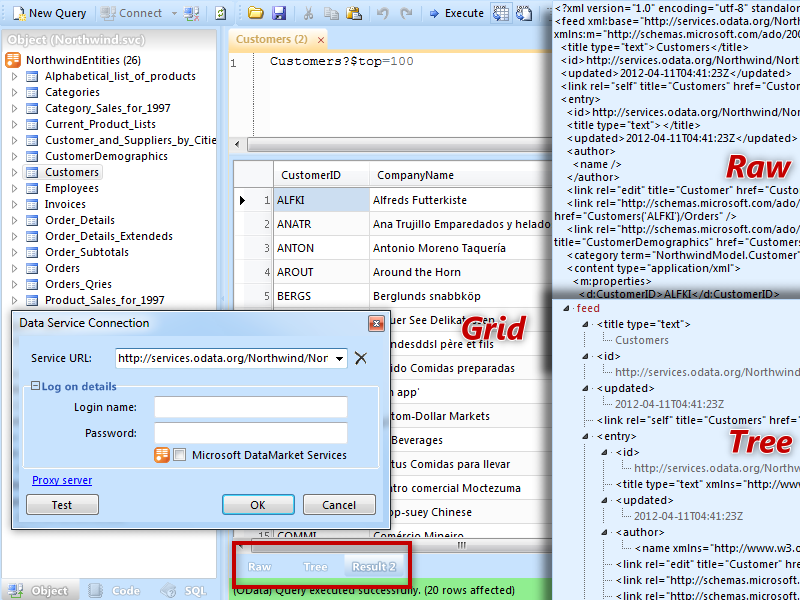
A Silverlight application that can browse OData Services. It is available as part of the OData SDK Code Samples, and is available online at Silverlight.net/ODataExplorer.

Excel 2010

PowerPivot for Excel 2010 is a plugin to Excel 2010 that has OData support built-in.

LinQPad

LINQPad is a tool for building OData queries interactively.

Sesame - OData Browser

A preview version of Fabrice Marguerie's OData Browser.

Client Libraries

Client libraries are programming libraries that make it easy to consume OData services. We already have libraries that target:

For a complete list visit the OData SDK.

OData Helper for WebMatrix

The OData Helper for WebMatrix and ASP.NET Web Pages allows you to easily retrieve and update data from any service that exposes its data using the OData Protocol.

Tableau

Tableau - an excellent client-side analytics tool - can now consume OData feeds

Telerik RadGrid for ASP.NET Ajax

RadGrid for ASP.NET Ajax supports automatic client-side databinding for OData services, even at remote URLs (through JSONP), where you get automatic binding, paging, filtering and sorting of the data with Telerik Ajax Grid.

Telerik RadControls for Silverlight and WPF

Being built on a naturally rich UI technology, the Telerik Silverlight and WPF controls will display the data in nifty styles and custom-tailored filters. Hierarchy, sorting, filtering, grouping, etc. are performed directly on the service with no extra development effort.

Telerik Reporting

Telerik Reporting can connect and consume an existing OData feed with the help of WCF Data Services.

Database .NET v3

Database .NET v3 - A free, easy-to-use and intuitive database management tool, supports OData


Browsing OData-formatted Web Database Content in PowerPivot for Excel

imageAfter downloading and installing PowerPivot for Excel 2010 from http://powerpivot.com/, click the PowerPivot tab to open the PowerPivot ribbon and click the PowerPivot Window Launch button to open its ribbon.

Update 3/14/2011: If you want to run a live test with the NorthwindTraders Web Database site hosted in an AccessHosting.com Trial account, connect to http://oakleaf.accesshoster.com/NorthwindTraders/_vti_bin/listdata.svc in a browser. When the Windows Security dialog appears, type AH\devtest1 as the username and access as the password,  and mark the Remember My Credentials check box:

image

Figure 1.

Click OK to display the OData metadata:

image

Figure 2.

imageLeave the metadata window open, click the From Data Feeds button to open the Table Import Wizard’s Connect to Data Feed dialog, type or paste the same Data Feed URL, http://oakleaf.accesshoster.com/NorthwindTraders/_vti_bin/listdata.svc for the demonstration Web Database, and add a Friendly Connection Name, as shown here:

imageFigure 3.

imageClick Next to open the Select Tables and Views dialog, after providing your credentials again, if requested. Mark the check boxes for the Source Tables (lists) you want to include:

image Figure 4.

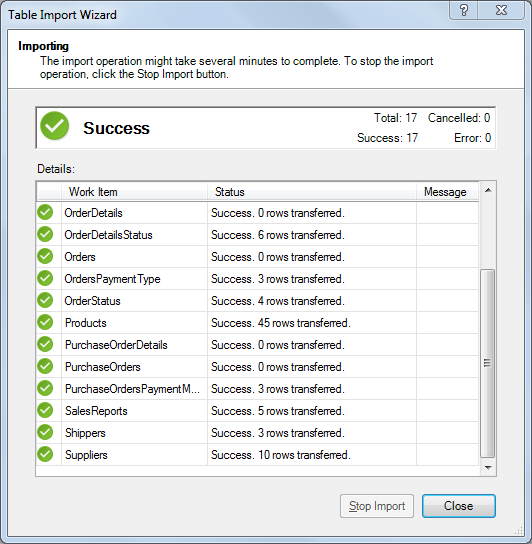
Click Finish to import the data:

image

Figure 5.

Click Close to display the contents of the first list in alphabetical order (Categories). Click the tab at the bottom of the page to display the list you want (Products for this example):

image

Figure 6.

Select the columns that don’t contain interesting information, right click a selected column and choose Hide or Delete to remove it fom the Pivot table, and drag foreign key (lookup) values, such as CategoryID and SupplierID to the left:

image

Figure 7.

At this point, you can perform all common Excel PivotTable operations on the PowerPivot data.